
Motor problems first — then the shared light table.
Find your symptom
The current limit tripped repeatedly (6 amps out of the box): the mechanism is binding, jammed, or too heavy. Free the mechanism, find the bind, then re-enable the motor in the app. Only raise the limit if the mechanism genuinely needs more and can take it.
A stall at start — it can't break free, or the motor is shorted. Disconnect the motor from the mechanism and test it free-spinning: fine alone = fix the mechanism; still cutting out = check the motor and its wiring.
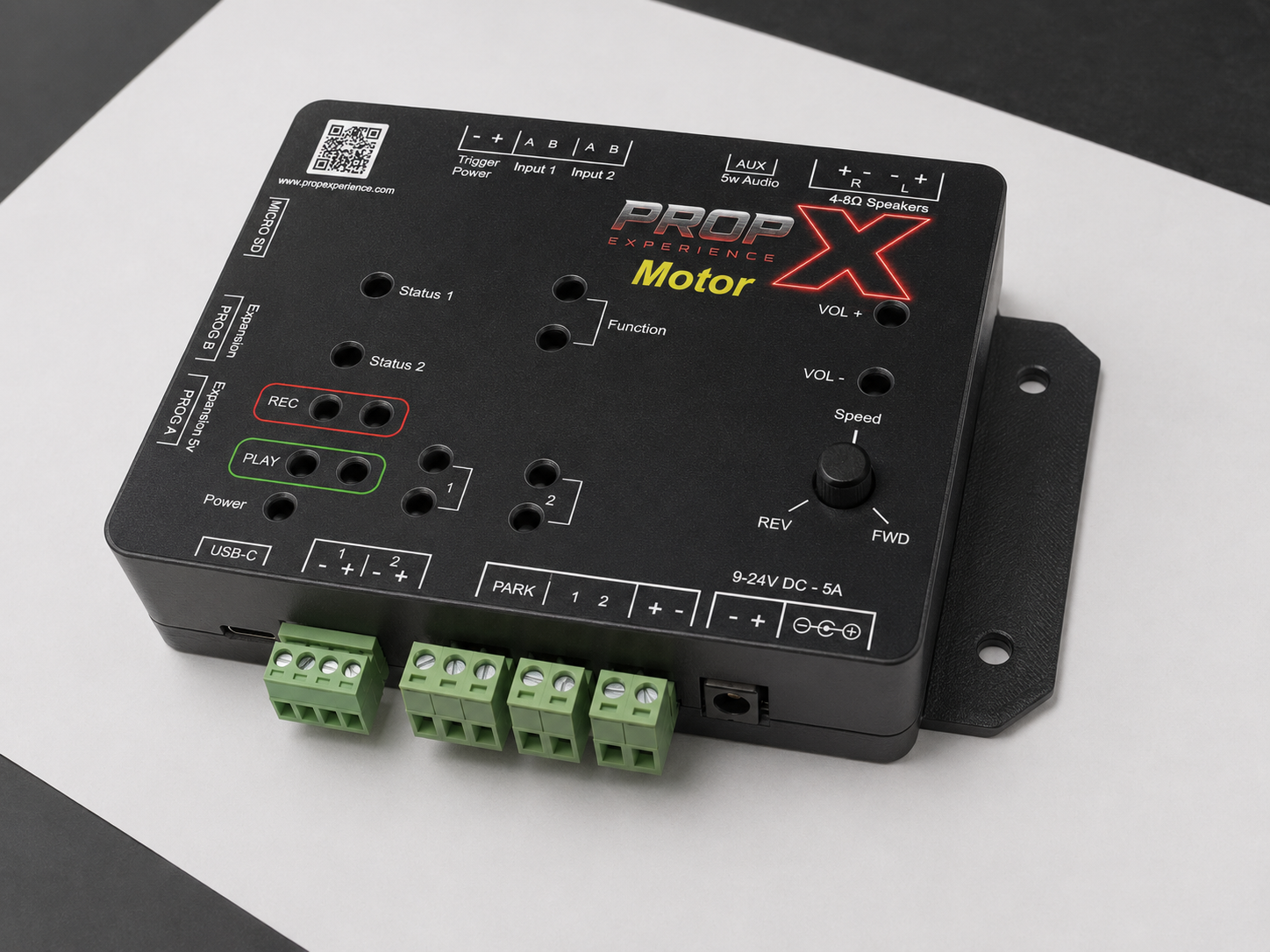
In the app: enable the motor and clear any fault. If dial control is on, the Speed knob rules — turn it off center, or disable dial control.
The two motor wires are swapped for your build. Unplug power and swap them on motor terminals 1 and 2 — that's the supported fix.
The home switch isn't closing or isn't wired to PARK. Check it physically clicks at the home position and re-seat its wiring *(PARK wiring detail —
#74)*. Note: the home switch is only watched during the return move — it is not an always-on end-stop.
Dial control is off. Enable it in the app (the app's slider is ignored while dial control is on).
That's the built-in soft-reversal ramp protecting your mechanism on quick direction changes. It's normal.
Set WiFi from the app, under your controller's WiFi settings — see WiFi setup. If it won't connect, or connects and then drops:
- Check the band. The controller only supports 2.4 GHz. If your router shows separate 2.4 GHz and 5 GHz networks, or a "smart" combined one, make sure you're joining the 2.4 GHz side.
- Double-check the password — re-enter it in the app if there's any doubt; a wrong password fails silently more often than it errors.
- Move it closer to the router, at least for setup — weak signal causes both failed connections and later drop-outs.
- Router password or network name changed? Re-enter WiFi from the app; the controller won't pick up the change on its own.
No Bluetooth to reach it right now? The 5-minute setup network (propx-XXXXXX, password = the serial number on the label) is a fallback for that specific case — it lets you configure WiFi without the app, but it's not a general fix for "offline." See WiFi setup for what to do if it never appears.
- Prop on output pair 1/2 won't fire, power problems: same fixes as the Pro — re-seat the − + pair, check the supply, swap + and − (harmless).
- Pairing: hold Record + Output 1 for 5 seconds until Status 1 flashes purple, then Scan within 60 seconds — pair your controller.
- Cloud remote control is coming soon.
- Sound: MP3 ≤32 MB; 4–8 Ω speakers; VOL + first.
- Updates: firmware updates.
What are the lights doing?
1 · Which light?
The Motor also has face lights: Input = a trigger is active, Fwd/Rvs = motor direction, Option = reserved for future features. Motor faults — a stall or a tripped current limit — never show on the status lights, only in the app: Status 1/2 keep showing the normal idle/run state even while a motor fault is latched.
Show the full table
| What you see | What it means | What to do |
|---|---|---|
| All lights flash red → green → blue at power-on | Normal start-up | Wait for blue |
| Status 1 solid blue | Idle, nothing playing | Nothing |
| Status 1 solid green | Something's active — ambient audio, a running show, or a trigger | Nothing |
| Status 1 flashing purple | Pairing mode active (60-second window) | Enroll the device in the app now, or wait for it to time out and try again |
| Both status lights flashing orange | Recording in progress | Normal if expected |
| Status 1 flashing yellow, Status 2 dark | Manual output-test mode (Output 1 held 10 seconds) | Press Play or Record to exit |
| Status 2 flashing yellow/purple | An output is on but no current flows — nothing connected or a broken wire | Power off; re-check that output's wiring |
| Status 2 flashing red | Overcurrent trip on an output (over 1.4 A) | The output is cut immediately — check it for a short or overload; clears 10 seconds after current returns to normal |
| Both status lights flashing red/orange/yellow | Factory-reset countdown in progress | Release the reset buttons now if this wasn't intended |
| Both status lights solid red | Factory reset just triggered | Wait for reboot |
| Flashing light blue at power-on | Installing a firmware update from a MicroSD card | Wait — do not unplug |
| Green, 3 blinks at power-on | Firmware update installed — rebooting | Wait for reboot |
| Red, 6 blinks at power-on | No usable firmware file found on the card (wrong model or a corrupt file) | Check you have the PropX-Motor file |
Still stuck?
Still stuck? support@propexperience.com — include your serial number, the lights, and the app's motor status (enabled? fault? locked off?).
Email us — we respond within 24 hours. Include your serial number, what the lights show, and what you were doing.
support@propexperience.com